Dran-View 6

- Mycket lättanvänt
- Väldigt snabb filinläsning
- Stöd för stora datafiler
- Effektiv filkomprimering
- Rullningsbara diagramaxlar
- Inbyggd ordbehandlare (RTF-editor)
- Grundläggande rapportgenereringsmoduler
- m.m.
-
- Produkttyp: PROGRAMVARA
- Artikelnummer: 030xxxx
-
-
Pro eller Enterprise?
Dran-View 6 finns i två varianter, Professional Edition, med fokus på användarvänlighet och enkelhet, och Enterprise Edition, med fokus på flexibilitet och kraftfulla funktioner.
Komplexitets- och prisöverväganden har lett fram till dessa bägge versioner. Alla våra användare kan kanske inte dra nytta av alla funktioner i Enterprise Edition, eller har råd med den extra kostnaden.
Vill Du ha funktionalitet liknande den i Dran-View 5 med förbättrad prestanda och ett fåtal nya funktioner bör Du välja Professional Edition.
Vill Du ha toppmodern grafisk funktionalitet, de nya rapportmodulerna, möjlighet att analysera data från flera samtidiga mätningar, lättanvända matematiska funktioner, COMTRADE- och PQDIF-inläsning, och många fler nya och förbättrade funktioner bör Du välja Enterprise Edition.

Professional, med fokus på enkelhet!
- Mycket lättanvänt
- Väldigt snabb filinläsning
- Stöd för stora datafiler
- Effektiv filkomprimering (små filer att skicka och lagra)
- Rullningsbara diagramaxlar, zoomfunktioner etc.
- Obegränsad Ångra/Gör om
- Inbyggd ordbehandlare (RTF-editor)
- Grundläggande rapportgenereringsmoduler (alla rapporter i RTF-format)
- Beräkna högupplösande trend- och övertonsparametrar från kurvformsdata (t.ex. vid startströmsmätningar)
- Formatmallar för enhetlig layout
- Separat övertonsskalning för spänning & ström
- Diagramtyper: Trend, Kurvformer, Magnitud/Varaktighet och DFT
- Automatiska uppdateringar via Internet
- Kompatibelt med Dran-View 5
- Rescue Kit - Korrigera klockinställningar, invertera ingångar eller ändra skalfaktorer i efterhand
Allt som Professional har, PLUS:
- Fullt presentationsstöd för samtidiga mätningar i upp till 16 olika punkter
- Matematiska formler (t.ex. jämför skillnader mellan två mätpunkter, läckströmmar etc.)
- Fler rapportgenereringsmoduler (alla rapporter i RTF-format)
- Användargränssnitt med dra-och-släppteknik
- Anpassningsbara verktygsfält, snabbtangenter & menyer
- Borttagning av valfri data från mätningen
- ”Flytande anteckningar” med egen text eller automatisk data
- Infoga bilder eller fotografier
- Använd "Bokmärken" för att snabb gå till sparade vyer
- Importera COMTRADE-filer från dina reläskydd
- Importera elkvalitetsdata från textfiler
-
Jämförelse
NY - Detta är en helt ny funktion
ALLA - Denna funktion finns nu för all instrumenttyper
FÖRBÄTTRAD - Denna funktion har förbättrats avsevärt
Användargränssnitt ProfessionalEnterpriseScrollningsbara (gummibands-) axlar NY ••Obegränsad ångra/gör om NY ••Översikts-, kurvforms-, DFT och magnitud/varaktighetsdiagram ••Tidsavsnittsväljaren NY ••Formatmallar som tillhandahåller enhetlig layout ••Händelsefilter/sortering NY ••Dra-och-släpp diagram, axlar och andra objekt NY •Infoga bilder och fotografier NY •Textbubblor förankrade i en datapunkt med egen text eller data NY •Anpassningsbara menyer, kortkommandon och verktygsfält NY •Fil- och systemfunktioner ProfessionalEnterpriseAvsevärt snabbare filinläsning (upp till tio gånger snabbare än DV5) NY ••Stöd för stora datafiler NY ••Ny, effektiv filkompression (DV6-filer blir hälften så stora som orginalen) NY ••Automatiska uppdateringar via Internet NY ••Bakåtkompatibel med Dran-View 5 ••Läser data från skyddsreläer (COMTRADE-filer) NY •Läser avgränsade textfiler NY •Ta bort del av mätning NY •Rapporter ProfessionalEnterpriseGrundläggande rapportmoduler ••Mätningstypberoende automatisk rapportgenerering NY ••Integrerad texteditor (RTF/DOC) NY ••Bokmärken NY •Valda händelser NY •Valda översiktsdiagram •Jämförelser mot EN-, IEC-, G5/4- och NVE-standarder NY •Flerplatsrapporter NY •Flera mätpunkter ProfessionalEnterprisePresentation och analys av upp till 16 samtidiga datamängder NY •Flerplatshändelsefilter (hittar händelser som förekommer på flera mätpunkter) NY •Tidssynkronisering NY •Matematiska jämförelser mellan mätpunkter NY •Reparationsverktyget ProfessionalEnterpriseJustera tidsstämplar ALLA ••Invertera strömtänger ALLA ••Ändra skalfaktorer ALLA ••Ändra inkopplingstyp ALLA ••Matematiska funktioner ProfessionalEnterpriseBeräkna översikts- och övertonsparametrar från kurvformsdata ALLA •Olika skalning för ström-, spännings- och effektövertoner NY ••Förbättrade DFT-funktioner för att välja och analysera övertoner ALLA •Matematiska formler FÖRBÄTTRAD • -
Varför uppgradera från Dran-View 5?
Dran-View 6 innehåller många nya och förbättrade funktioner jämfört med sin föregångare Dran-View 5. Mjukvaran är optimerad för snabbhet och stora datamängder, vilket ger Dig den prestanda Du behöver för den nya generationens instrument.
Vi har utvecklat Dran-View 6 för att hålla jämna steg med produkter och standarder som ständigt utvecklas och förändras, så som Power Xplorer PX5, IEC61000, EN50160 och ITIC kurvor, såväl som att täcka behovet av nya och utökade funktioner, t.ex. utvärdering av flera samtidiga mätpunkter och COMTRADE- (från skyddsreläer) och PQDIF-inläsning.
Dran-View 6 har en helt ny mjukvaruarkitektur som skiljer sig mycket från sina föregångare, utvecklad med hjälp av de modernaste verktygen på marknaden. Dran-View 6 har en ny, unik, instrumentoberoende datalagringsmotor som drar nytta av snabba kompressionsalgoritmer och de senaste minnesmappningsteknikerna som tillhandahålls av moderna operativsystem. Dessa, och mycket annat, fanns inte då Dran-View 5 utvecklades för mer än tio år sedan.
All nyutveckling nu kommer att ske i Dran-View 6. Vill Du, med hjälp av den nya, helautomatiska funktionen "Dran-View Update", få tillgång till alla nya funktioner så snart de utvecklats, bör Du uppgradera till Dran-View 6.
Dran-View 6 är den nya, optimerade mjukvaran för elkvalitetsdata.
Alla nya och framtida funktioner kommer bara att komma till Dran-View 6.
Uppgradera till Dran-View 6 idag, och dra nytta av alla nya, spännande funktioner.
-
* Endast i Enterprise Edition
- Rapportgenerator
- Bokmärken / Diagram *
- Flera mätpunkter *
- Reparationsverktyg
- Lättanvända formler *
- COMTRADE, text, csv *
-
Rapportgenerator

Dynamisk - kraftfull - uppfyller just Dina behov
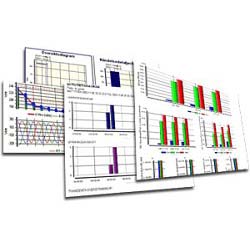
Automatisk RapportVälj vilka diagram, listningar, standarder, etc som Du vill ha för just Din mätning!
Dran-View 6 erbjuder över 20 olika dynamiska rapportelement som Du kan inkludera i Din rapport.
Bland dessa finns bl.a. översiktsdiagram över valfria parametrar och gränskurvor, jämförelser mot EN50160, IEC61000-2-2/2-4/2-12 etc, valfria värsta händelser med eller utan diagram,och mycket mer. Du kan också mata in egna in egna standarder!
Spara Dina favoritrapporter och kör dem enkelt på alla Dina mätningar!
Lättanvänd - intelligent - relevant
Anpassad RapportMed bara några få musklick skapar Du proffesionella och relevanta rapporter!
Dran-View 6 känner automatiskt av vilken typ av mätning Du vill skapa en rapport för och väljer ut de diagram och listor som är relevanta för just Din mätning. Den automatiska rapportgeneratorn är lätt att använda och kräver inte att Du fyller i någon information.

Omedelbar redigering - skriv ut eller spara direkt - välkänt upplägg
Redigera Din rapport direktDran-View 6 har en inbyggd ordbehandlare där Din rapport visas så snart den skapats.
I textredigeraren kan Du snabbt redigera Din rapport, infoga kommentarer eller bilder, flytta, anpassa eller radera element, ändra Din rapports layout, mm. Verktyget ser ut precis som Din vanliga ordbehandlare, och är lika lätt att använda. Skulle Du ändå föredra det verktyg Du är van vid kan Du med en enda knapptryckning öppna Din favortordbehandlare och flytta över Din rapport.

Välj parametrar - välj utseende - välj gränsvärden
Valfria översiktsdiagramVälj bland ett antal fördefinierade översiktsdiagram, eller skapa Dina egna!
Ange precis vilka parametrar Du vill presentera och hur de ska se ut i översiktsdiagramet.
Modulen åter dig att mata in egna gränsvärden, presentera uppmätta kanaler eller formlerkanaler beräknade utifrån Du kan skriva själv, välj presentationsform, etc.
7 färdiga standarder - egna standarder - egna gränsvärden
Jämför mot standarder och gränsvärdenKontrollera kompabilitet mot normer och standarder.
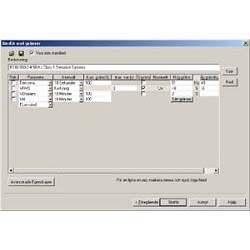
Välj mellan ett antal fördefinierade standarder, te.x. EN50160, IEC 61000-2-2, IEC 61000-2-4, IEC 61000-2-12, SS 421 18 11, etc.
Rapportgeneratorn känner själv av frekvens och spänningsnivå och anpassar gränsvärdena efter dessa. Kompabilitet presenteras sedan parameter för parameter i en detaljerad rapport.
Du kan också mata in egna gränsvärden eller definiera egna standarder. Ett intuitivt grafiskt gränssnitt låter Dig välja parametrar, gränsvärden och tidsintervall. Välj om ett krav skall vara en rekommendation eller tvingande, sätt gränser för individuella övertoner, etc.
När Du skapat en ny uppsättning gränsvärden kan Du spara den som en standard. Då kommer den med i listan med rapportmodulerna, och det är bara att kryssa i en ruta för att jämföra vilken fil som helst mot Dina nya gränser.
Värsta händelser - detaljerade diagram - välj parametrar
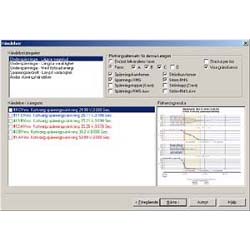
Egna händelserVälj själv vilken information Du vill presentera om mätningens mest intressanta störningar.
För varje störningstyp skapas en lista med de värsta händelserna efter olika kriterium, t.ex. längst varaktighet eller högst magnitud. Ur denna lista kan Du välja vilka händelser Du vill presentera i Din rapport.
För varje händelse kan Du styra vilka parametrar som skall visas.
Ett diagram efter Dina specifikationer kommer att infogas i Din rapport per vald händelse.

Störningar - CBEMA/ITIC - vilken fas
Magnitud/varaktighetsdiagram för över- och underspänningarEtt diagram visar mätningens störningar sorterat efter magnitud och varaktighet.
Få en överblick över hur allvarliga störningarna är. Du kan välja att jämföra mot gränskurvor så som CBEMA eller ITIC, eller skapa Dina egna gränsvärden. Antalet störningar utanför gränsvärdena visas under diagrammet.
Du kan också lätt se på vilken fas de intressanta störningarna inträffat.
-
Bokmärken / Diagram

Återställ - skriv ut - infoga i rapporter
Varför bokmärken?Klicka på en enda knapp, och Du har skapat ett bokmärke av Ditt dokument som det ser ut just nu!
Bokmärkena kan användas som en utskriftskö, och skickas direkt till printern. Du kan också infoga bokmärkenena i Dina rapporter.
Dubbelklickar Du på ett bokmärke återställs det, perfekt för t.ex. presentationer. Välj om Du vill ersätta Ditt befintliga fönster eller öppna ett nytt!
Med ett enkelt klick kan Du också flytta alla Dina bokmärken som bilder till Dran-View's inbyggda textredigerare, eller Din favoritordbehandlare.

Ett klick - spara Din layout - miniatyrer
Lätt att skapa, lätt att hitta!Lägg upp Dina diagram precis som Du vill ha dem och spara layouten!
Använd Dran-View's intuitiva dra-och-släpp-funktioner för att flytta runt diagram, tabeller, bilder, etc. precis som Du vill ha dem. När Du är nöjd med Din layout klickar Du på en enda knapp, och Du har skapat ett bokmärke!
Dina bokmärken visas som miniatyrer i en lista, så att Du snabbt kan komma åt dem och veta vilket bokmärke Du vill ha.

Skugging mellan extremvärden
Skuggning mellan serierOmrådet mellan min- och maxserierna skuggas automatiskt så att Du enkelt kan se en parameters extremvärden över tiden.
Välj en mjuk skuggning, ifylld yta, eller stäng av helt.

Naturligt - enkelt - snabbt
Rullningsbara axlarZooma och panorera axlar utan att byta verktyg!
Det är bara att klicka på en axel och dra i den för att panorera, eller håll ner någon av ALT- eller CTRL-knapparna på tangentbordet för att zooma, oavsett vilket verktyg Du har valt.
Klicka-och-dra-funktionerna i Dran-View 6 känns så naturliga att Du kommer att undra hur Du klarat
-
Flera mätpunkter
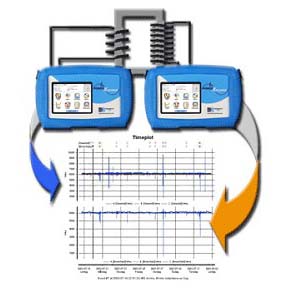
16 olika mätpunkter - samma diagram - oavsett instrumenttyp
Upp till 16 olika mätpunkter i samma diagramHar Du flera mätpunkter i samma system och vill jämföra data mellan dem?
I Dran-View 6 kan Du lägga till upp till 16 olika mätfiler som separata mätpunkter i samma dokument. Du kan visa data från olika mätpunkter i samma diagram, tabell, etc.
Till vänster ser Du ett diagram som är stackat per mätpunkt, men Du kan också visa kanaler från olika mätpunkter på samma Y-axel.
Det spelar ingen roll vilken typ av instrument Dina mätfiler kommer från. Har Du te.x. ett fast installerat instrument och kopplar temporärt in ett mobilt på en annan mätpunkt kan Du ändå lägga till dem i samma dokument!
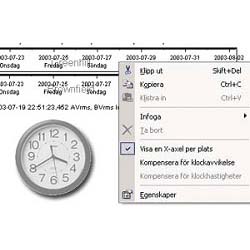
Justera klockavvikelse - justera klockdrift - en X-axel per mätpunkt
Synkronisera Dina mätpunkterDu kan enkelt visa en X-axel per mätpunkt, och panorera eller zooma olika för varje mätpunkt i samma diagram.
Skulle klockorna vara olika inställda kan Du panorera axlarna tills mätpunkterna stämmer överrens i tiden. Välj sedan att synkronisera mätpunkterna från axelns meny, och tidsstämplarna från den ena mätpunkten kommer att ändras så att de stämmer överrens med den första.
Skulle klockorna gå olika fort är det bara att upprepa proceduren på en annan punkt i tiden, och Dran-View kommer automatiskt att kompensera för klockdrift på den ena mätpunkten!

Beräkna mellan mätpunkter
Beräkningar mellan mätpunkterDu kan till och med skapa formler som utför beräkningar mellan olika mätpunkter.
Till vänster visas skillnaden mellan spänningarna i två olika mätpunkter. Läs mer om formler senare!
-
Reparationsverktyg

Korrigera felaktiga inställningar
Korrigera felaktiga inställningarHar Du tömt ett instrument efter en lång mätning bara för att upptäcka att det var felaktigt konfigurerat eller inkopplat? Måste Du göra om Din mätning? Inte med Dran-View's reparationsverktyg!
De flesta uppmätta parametrar går att korrigera även om Du inverterat en tång eller prob, valt fel inkopplingstyp, nominell spänning/frekvens eller skalfaktorer.
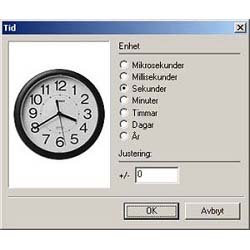
Justera klocktid
Justera klocktidGlömt ändra instrumentets klocka till sommar- eller vintertid? Med reparationsverktyget kan Du enkelt justera tidsstämplarna i Din mätfil.

Invertera kanaler - byt inkopplingstyp - byt nominella värden
Justera inkopplingstyp, skalfaktorer och inverterade tänger/probarÄven om Du konfigurerat Ditt instrumet fel kan det mesta av Din mätning räddas. Välj bara rätt inkopplingstyp och nominella värden i räddningsverktyget och låt Dran-View göra jobbet.
Har Du inverterat en prob eller tång, kryssa bara i dess ruta i den här dialogrutan så rättas Dina fel.

Ändra skalfaktorer
Ändra skalfaktorerDran-View kan också justera felaktiga skalfaktorer på en eller flera kanaler. Mata bara in rätt värden och Dran-View räknar om Din data.
-
Lättanvända formler
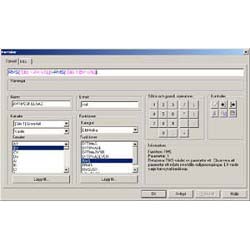
Peka-och-klicka - kraftfullt - lättanvänt
Peka-och-klickaDet nya gränssnittet för formler i Dran-View 6 är utformat så att även användaren med begränsad kunskap enkelt kan skapa egna formler, samtidigt som det är tillräckligt kraftfullt för att kunna genomföra avancerade analyser.
Kanaler och funktioner kan väljas ur en lista. Dubbelklicka på en funktion för att lägga till den i Din formel. Du kan skapa en formel enkelt med bara musen!
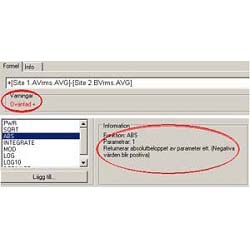
Löpande felrapportering - den funktiosbeskriving Du behöver innan Du behöver den
Löpande felrapportering och funktionsbeskrivningSkulle Du göra fel skriver Dran-View genast under formelfältet vad som inte stämmer. Du behöver aldrig bekymra Dig om felsökning.
När en funktion är markerad i funktionslistan visas en beskrivning av vad den gör och hur den fungerar brevid listan. Du behöver aldrig fundera på hur en specifik funktion fungerar - hjälpen följer markeringen.

Färgkodning - beskrivande namn
Färgkodning förenklarFunktioner, kanaler, siffror och operatorer är färgkodade så att Du lätt kan se hur en formel är uppbyggd. Du behöver inte fundera över vad som är vad.
Alla kanal- och funktionsnamn är beskrivande - Du förstår vad det är när Du läser texten.

Få automatiskt formler från DV6-filer - importera - modifiera
Enkelt att hantera formlerAlla Dina formler visas i en egen flik under Dina diagram. Öppnar Du en Dran-View 6 fil där någon annan använt en formel flyttas den in i Ditt system..
Slå på och av formelkanaler genom att kryssa i och ur en kryssruta - precis som uppmätta kanaler. .
Du kan lätt exportera formler till en fil och skicka till Dina kollegor - eller importera formler från filer..
Enklare modifikationer som att byta namn eller enhet på en formel kan göras direkt i formellistan.
-
COMTRADE, text, csv
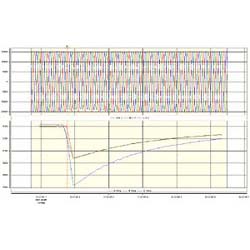
Reläskydd - flera grupper - digitalkanaler
Läs in reläskyddsdataNu kan Du även läsa in Data från reläskyddsutrustning. I Dran-View kan Du beräkna alla halvcykelvärden Du saknar.
Olika grupper kommer att behandlas som olika mätpunkter. Kom i håg att Du som har Enterprise Edition kan titta på data från olika platser i samma diagram. Har Du flera reläer som löst ut samtidigt? Då kan Du jämföra data mellan dem. Vill Du se skillnaden mellan olika fel? Läs in bägge filerna och jämför!
Dessutom har Dran-View har fullt stöd för digitalkanaler!
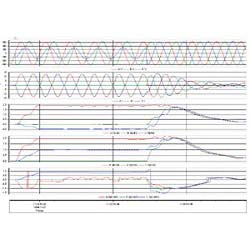
Automatiskt - enkelt - snabbt
Beräkna halvcykelparametrarGenererar Ditt reläskydd eller Ditt mätinstrument (te.x. vid motorstartsmätningar) inga eller bara ett fåtal halvcykelparametrar? Dran-View 6 kan räkna ut övertoner, effekter, frekvens, och mycket mer! Innehåller Din fil bara kurvformsdata startar Dran-View själv beräkningarna, Du behöver inte göra någonting!
Jämfört med tidigare versioner är Dran-View 6 betydligt snabbare på att beräkna halvcykelvärden.

Detaljstyrning - kraftfullt - lättanvänt
Detaljerad informationVill Du så kan Du däremot styra precis vilka parametrar som skall
beräknas, och hur. Du kan välja:
- RMS
- Toppvärden
- THD (Total, udda och jämn)
- Frekvens
- Effekter (VAR, VA, PF, DPF, Watt)
- Fasvinkelskillnaden för grundton
- Fasspänningar då huvudspänningar är mätta
- Övertoner (Magnitud och fasvinkel för ström, spänning och effekt)
- Symmetriska komponenter för alla övertoner (Magnitud och fasvinkel för ström, spänning)
- Obalans
- Valfritt antal övertoner
- Utdata upp till instrumentets samplingshastighet
-
* Indicates a bug which has been corrected.
+ Indicates a new or improved feature
Version 6.13.00 2011-09-19
* Uses a new Internet server for updates and user registration.
* The Setup utility incorporates latest HASP driver for Win7.
* PQ Plus/PQ Lite shows same textual event information as instrument.
* New improved Encore download engine + possibility to specify port for download.
* Improved support for Medcal products.
* Possibility to request a new verification e-mail in user registration.
* Faster PQDIF file read.
* File Save, Cancel on close window now operates properly.
* Various bug fixes for “strange files”
* Improved Timeplot/Waveform calculations:
+ Smoother results from sliding window FFT and RMS calculations.
+ Improved support for motor applications, i.e. varying frequency.
+ Improved support for measurements with different mains frequencies on different channels.
+ Proper results when using Delta connection.
+ Additional virtual L-N, L-L data for both Delta and WYE.Version 6.11.02 2010
+ Improved support for Medcal PQDIF files
+ Added Russian and Polish.
+ Changed company references from “Dranetz-BMI” to “Dranetz”
* Fixed MIN/MAX/AVG Energy Report calculations
+ Put a silencer on PQDIF import errors
* Fixed crash in event filter cancelation.Version 6.8.00 2009-03-04
+ New report with national power quality standards of China.
+ Finnish language.
+ Localization of Dran-Set 2. The companion software Dran-Set 2 for working with PX5/PG400/PowerVisa setup files now speaks English, French, Italian, German Spanish, Swedish and Simplified Chinese.
+Dran-Set 2 is also upgraded to be compatible with newest instrument firmware 2.11Version 6.7.01 2008-10-20
Includes Dran-Set 2.3, which supports Px5-family firmware 2.10
+ Improved the phasor so that it shows harmonics based on the fundamental frequency if none are available for the frequency of the selected portion of data.
+ Increased the maximum length of a math formula from 1024 to 8196 characters.
+ Added Thai language support.
+ Added Traditional Chinese language support.
* Fixed a bug which cased some LF datapoints to dissapear during HF events
* Fixed a bug which sometimes made time-synchronization between sites impossible.
* Fixed a bug which caused multi-site bookmarks to sometimes malfunction.
* Fixed a bug which caused the chart properties dialog to appear when the cursor reached the end of the screen when panning with the keyboard.
* Fixed a bug which caused problems with current harmonics in the custom limit report.Version 6.6.04 2008-06-02
+ The position of the mouse pointer is now visible in the event ruler
+ Holding down the ALT-key while creating or modifying delta markers now allows users to create markers which extends only in one direction
+ Improved program memory footprint
+ The Add Site and Append Site open file dialogs now resize
+ The sync mode now appears in PowerVisa/PG4400/Px5 settings reports
* Fixed a bug which would cause the wrong dialogs to appear when double-clicking on an object inside a chart when the window was scrolled down
* Fixed a bug which would sometimes turn on math channels in one chart which were active in another when clicking 'OK' in the first chart's propery dialog
* Improved German language
* Fixed a bug which sometimes caused the report writer to take very long to complete
* Fixed a bug which sometimes caused errorneous values for harmonics in the standards compliance reports
* Fixed a bug in the math channels which sometimes caused very large errorneous values
* Fixed a bug which rarely caused Dran-View to crash when inserting a Magnitude/Duration chart
* Fixed a bug which sometimes caused the 'One sample per waveform cluster' option in the Harmonics/Timeplot calculator to sometimes not take effect.
* Fixed a bug which sometimes caused undefined behaviour when using the PREV, INTERVALMIN, INTERVALMAX or INTERVALAVG functions in math channels.
* Fixed a bug which sometimes caused frequency instead of harmonic index to be printed on the X-axis of DFT charts when the fundamental frequency of the result deviated significantly from the measurements nominal frequency.Version 6.6.03 2008-04-07
+ Added some support for Medcal/N
+ Added support for text files with more than 16.000 bytes per line
* Fixed a bug which caused the threshold lines to end at the last waveform event instead of at the end of the measurement.
* Fixed a bug which sometimes caused Dran-View to crash when printing many bookmarks.
* Fixed a bug which caused "No waveforms" to be displayed in place of the phasor or DFT chart for some events, even if the event had waveforms.
* Fixed a bug which caused events and configurations to remain even after data had been deleted.
* Fixed a bug which caused the Rescue Kit to crash when changing the input configuration to a configuration with no totals.Version 6.6.02 2008-03-14
* Fixed a bug which caused Dran-View to crash on start. NOTE: this crash occurs before the update. Users experiencing this problem needs to install the update manually, or delete the ".DAT" files in Dran-View's program folder.
* Fixed a bug which caused Windows to display an error message when double-clicking a data file when no instance of Dran-View was running.
* Fixed a bug which sometimes caused the report writer to become very slow.
* Fixed a bug which caused Dran-View to crash when opening older ".DV6" files containing phasors or DFT-charts, but with no waveforms in the measurement.Version 6.6.01 2008-02-12
+ Less usage of memory
+ faster wavemath calculation, harmonic scaling, event filter and rescue kit
+ faster and inproved formulas
* many crasches fixedVersion 6.5.04 2007-11-15:
+ Added support for PowerXplorer family firmware version 2.7.0 Added a
+ math function to find the timestamps of positive zero transitions
+ Bookmarks are now inserted after the selected bookmark instead of at
+ the end of the list Dran-View no longer automatically stacks by serie
* A bug which occasionally caused out of memory error messages when opening Dran-View 5 files with 658 or PQPlus data was fixed
* A bug which caused the print preview of bookmarks to repeatedly redraw when viewing two pages was fixed
* A bug which caused errorneous printouts the first time a chart was printed directly to an Adobe Acrobat 7 PDF was fixed
* A bug which caused the PF axis zero point at +-1 option to have no effect on PF channels without average or value series was fixed
* A bug which caused the Harmonics/Timeplot Calculator to not genereate LN waveforms or calculate power parameters for delta measurements was fixed
* Several bugs in the Math Function editor were fixed
* A bug which sometimes caused empty pages to appear at the end of printouts was fixed
* A bug which caused Dran-View to crash when dragging a DFT chart from one pane and dropping it in another was fixedVersion 6.5.02 2007-09-26
+ The PQDIF Export output files are now compatible with PQView.
+ Dran-Set 2 now supports PowerGuide and PowerXplorer.
+ The Advanced Event Filter now remembers it's settings.
+ Interruptions are now included in the Mag/Dur charts.
* Fixed a bug which caused zero time to be displayed under the delta marker.
* Data from DR8000 are now presented in local time instead of UTC.
* The statistics chart now correctly scale powers as kiloX.
* The standards compliance reports can now be run on delta configured Encore data.
* Fixed a bug which caused all series to be turned on if only AVG was selected in the DFT chart.
* Fixed a bug which caused the Tech Rental and Livingstone versions to be unable to open DEMO files.Version 6.5.00 2007-06-20
+ The read-only version Dran-Set 2 has been added to all installation and update packages.
+ The Harmonics/Timeplot Calculator dialog no longer reverts to small size when the settings match 'Off' or 'Default'.
+ New Advanced ASCII Export! (Enterprise Edition only)
+ Much improved settings for the Data List. (Enterprise Edition only)
+ The frequency tracking for DFT charts and Phasors has been improved.
+ The nominal frequency guessing has been improved.
+ Dran-View now corrects errorneous Px5-family datafiles where half-cycle RMS values on channel C-A sometimes drops to 0 volts.
* The 1 week THD and frequency requirements were missing from a few of the NVE reports, this has been fixed.
* The '1 Week' aggregation time previously read '1 Hour', this has been fixed.
* A bug which caused several power harmonics channels to be created for each phase if the connection type was delta and the Harmonics/Timeplot Calculator was run with the "Add LN waveshapes if LN is measured" option on was fixed.
* A bug which sometimes caused Dran-View to crash when deleting Delta markers was fixed.
* A bug which caused Dran-View to crash when deleting sites was fixed.
* A bug which made it hard to click events in Mag/Dur charts was fixed.
* A bug which caused Dran-View to cache data when downloading from InfoNodes even if the download failed was fixed.
* A bug which caused Dran-View to leak small amounts of memory was fixed.
* A bug which caused the "Select Site" dropdown list to be very small in all languages except english was fixed.
* A bug which caused sites from the wrong documents to be displayed in the "Choose Action" dialog when dragging and dropping files with a document already open was fixed.
* A bug which sometimes caused Dran-View to crash when drag-and-dropping a DFT chart was fixed.
* A bug which sometimes caused Dran-View to crash when reading Px5-files from older firmware versions was fixed.
* A bug concerning THD from DR8000 was fixed.
* Some errors in the German texts was fixed.
* A bug which caused the Data List to sometimes not display the end of the selected data was fixed.Version 6.4.05 2007-04-24
Version 6.4.04 2007-04-17
* Fixed a bug when saving PQD-files as DV6 and opening them again.
+ A demo version of Dran-Set 2 is added to the CD-package.
* A bug which caused the data list to display no data from sites other than the first was fixed.
* A bug which caused the data list to be empty under certain circumstances if only harmonics was selected was fixed.
* A bug which caused Dran-View to crash when resampling data in the data list if there was no data was fixed.
* A bug which caused Dran-View to crash in the Automatic-Standard PQ report generator if there was more than 999 voltage swells in the report range was fixed.Version 6.4.03 2007-04-12
+ Inactive pane is now shown with a grey background.
+ Additions was made to the ASCII-export feature.
+ Added a properties button in the data list view.
+ ASCII-import column guessing was improved.
* X-axes no longer loose their lock settings when turning off all previously visible channels.
* Tab formatting is fixed in EN50160 report.
* A bug which caused some blank pages to be inserted into reports was fixed.
* A bug which caused some dialogs to be malformed when using other display settings than 96 DPI was fixed.
* A bug which sometimes caused THD parameters from PQDIF-sources to be unscalable was fixed.
* A bug which rarely caused Dran-View to crash when viewing Px5-family generated EN50160 events was fixed.
* A bug which caused Dran-View to crash when selecting multiple files, clicking on one of the selected files other than the first, dropping them in an open Dran-View window, and selecting "Append to selected site" was fixed.
* Fixed a bug which sometimes caused incorrect timestamps on DR658 HF data.
* A bug which caused some phase angle channels in DFT charts to dissapear was fixed.
* A bug which made it impossible to run the rescue kit after having run harmonic scaling was fixed.
* A bug which caused the "Ignore consecutive delimiters" option in ASCII-import to malfunction was fixed.
* A bug in the frequency detection was fixed.
* A bug which caused the rescue kit scale factor change function to malfunction when the event filter was active was fixed.
* A bug which caused some Misc. Transient events from Px5-family instruments to be incorrectly characterized in reports was fixed.
* A bug which sometimes caused Dran-View to crash when a lot of Channel Note objects was present was fixed.Version 6.4.02 2007-02-14
+ Improved Report Writer performace.
+ Improved calculation of nominal voltage.
+ Single phase measurements now open with only A and D channels visible.
+ Added two new THD calculation methods.
* Fixed some items in dialog boxes that were too small to fit their text in some languages.
* A bug which caused Dran-View to crash when inserting channel notes on parameters with high magnitudes was fixed.
* A bug which caused the Harmonics/Timeplot Calculator to not generate parameters on delta measurements was fixed.
* A bug which sometimes caused the Report Generator to crash was fixed.
* A bug which caused the rescue kit to always operate on the first site in a document was fixed.
* A bug which caused Dran-View to save the first RTF view instead of the active one when saving as RTF was fixed.
* A bug which caused incorrect tab formatting in some reports was fixed.
* A bug which caused clipboard operations to malfunction in the math formula editor was fixed.
* A bug which caused the Load Profile to sometimes malfunction when there are many sites present was fixed.Version 6.4.01 2007-01-15
* A bug which caused Dran-View to fail when reading large files on systems with limited memory resources was fixed.Version 6.4.00 2007-01-12
Version 6.3.01 2006-11-08
+ A new option to print borders around each Y-axis row was added.
+ The performance of downloads from Encore Series Software was improved.
+ The ASCII-export dialog has been reworked.
+ Dran-View now filters out errorneous initial journal events from PX5/PG4400.
+ Phasor magnitudes are now always in absolute.
+ Phasor can now show magnitudes in footer.
+ The error reporting when file reading fails has been improved.
+ The active tool is no longer loaded from a saved file.
+ Some performance improvement for DFT calculations.
+ DFT charts now print labes for interharmonic groups.
+ Dran-View now supports digital channels from Encore Series data nodes.
+ Changing a site name now changes the name in the configuration reports too.
+ Improved DFT calculations.
+ Improved reading of faulty PQDAQ-files.
* Too small drop-down lists in the phase table dialog was made larger.
* An misspelled Swedish text string was corrected.
* PQDIF files containing waveforms with generic phases now works correctly.
* Dran-View now handles custom names in PQDIF-files correctly.
* Changing DFT-chart specific settings in the chart properties dialog no longer causes a DFT-recalculation in other DFT charts or phasors.
* A few minor issues with axis scaling in reports were fixed.
* An error which caused Chineese to be unreadable was fixed.
* An error which caused some text unreadable in Chineese was fixed.
* An error which caused the energy to not accept zoom levels as time range source when energy channels were turned of was fixed.
* An error which caused some data points to be omitted in the data list for distributed statistics charts was fixed.
* An error which caused math formula names to be changed to uppercase letters was fixed.
* An error which caused channels from the wrong site to be displayed in the math formulas edit dialog was fixed.
* An error which caused two power harmonic channels to appear for each real channel in the DFT chart was fixed.
* An error which caused always-zero digital channels to behave incorrectly in some cases was fixed.
* An error which caused the area marker to sometimes dissapear after changing DFT chart settings was fixed.
* An error which caused too many decimals to be displayed in text bubbles and delta markers was fixed.
* An error which caused greek prefixes to not be displayed in many places was fixed.
* An error which caused math formula DFT functions to sometimes not generate any data was fixed.
* An error which caused the EN50160 report to include data recorded during events was fixed.
* An error which sometimes caused Dran-View to crash when importing 658 data was fixed.
* An error which rarely caused Dran-View to crash on start if it crashed during shutdown was fixed.
* An error which rarely caused Dran-View to crash if a data list was created from an empty chart.
* Harmonics/Timeplot Calculations changed when reading PQPlus and PQLite files so they won't overwrite timed readings
* A crash in the DFT chart when showing phase angle channels was fixed
* A crash in the Phasor Properties Dialog after selecting a large area with the areamarker tool was fixed
* A cache issue with the Phasor Properties Dialog was fixed
* A bug which sometimes caused channels to not plot even if they were enabled was fixed
* Keyboard focus is now restored to active view after Undo, so that the user can press Ctrl-Z repeatedlyVersion 6.3.00 2006-10-23
+ The phasor diagram has been greatly improved
+ Added a new option to keep the scaling between similar Y-axes synchronized
+ Symbols for locked or synchronized axes are now displayed under the axis
+ It is now possible to run some Harmonic/Timeplot calculations on generic-phase COMTRADE/Text channels
+ Many performance improvements have been made
+ Harmonic scaling options can now be saved as default
+ The ordering of axes when they are created has been improved
+ Dran-View can now accurately guess the connection type for 4300 files
+ The Synchronize Y-Axes Zero Points feature has been improved
+ Default visible channels has been improved for continious logger mode
+ Default Harmonics/Timeplot Calculator options changed to "Overwrite" and "Totals" activated
+ Added option to print only active event marker
+ Help texts and manuals updated
+ TDD calculations changed
* A bug which rarely caused an areamarker to be placed at 1970-01-01 when reading DV6 files was fixed
* A bug which sometimes caused errors when reading multi-site DV6 documents was fixed
* A bug which sometimes caused Dran-View to crash after clicking 'Cancel' while performing Harmonics/Timeplot calculations was fixed
* A bug which sometimes caused DFT chart to initially display no data after opening a DV6 file was fixed
* PowerXplorer over- and underdeviation parameters was previously incorrectly given volts as their unit. These are now % instead
* A bug which caused peak detector values from 4300 to be incorrectly plotted was fixed
* A bug which caused drawing artefacts on surrounding charts when the DFT-chart toggled between data and no data was fixed
* Bugs which caused the DFT chart footer to not update correctly were fixed
* A bug which caused pictures and phasors to sometimes double in size after printing was fixed
* A bug which caused the phasor to incorrectly anti-alias was fixed
* A bug which caused the phasor footer to contain data from non-existent channels was fixed
* A bug which caused the rescue kit to sometimes insert errorneous data points when inverting channels was fixed
* A bug which caused the symbols indicating axis placement to be drawn in incorrect positions if the window had been scrolled down while dragging axes has been fixed
* A bug which caused a chart to have a too large minimum size after deleting stacked axes via the keyboard has been fixed
* A bug which caused errorneous data to be displayed in the DFT-footer RMS columns in AVG-only mode has been fixed
* The status bar box indicating the template in use has been clarified
* A bug which caused bar charts with only one data point to plot incorrectly was fixed
* A bug which caused statistics chart report modules to incorrectly remember their last settings was fixed
* A bug which prohibited the distributed statistics chart report module from plotting the accumulation series was fixed
* A bug which prohibited statistics chart report modules from plotting certain power parameters was fixed
* A bug which prohibited users from setting the X-Axis Autoscale Range Factor in the Chart Properties Dialog Axis Page was fixed
* A bug which caused incorrect window titles to be displayed in the Custom Report Wizard dialog for statistics and profile report modules was fixed
* A bug which caused axes locked to ranges greater than the autozoom range to sometimes behave incorrectly was fixed
* A bug which caused the Data List to crash in Simplified Chineese was fixed
* Prevented some rare bugs when running wavemath on files with odd combinations of waveform
* A bug which caused the rescue kit to change phase descriptions of current channels to LL phases after changing connection type from D to Y was fixed
* A bug in the initial plotting of the Harmonics Demo Tool was fixed Version 6.2.07 2006-09-11
* A compatibility issue with Encore Series Software 4.1.1 was fixed.
* A bug which caused version numbers to appear in Windows Metafiles even if the user had registered was fixed.
* A bug which caused the Magnitude/Duration chart to not recognize clicks on event markers while in a scrolled-down window was fixed.
* The THD Timeplot With Worst Case Spectra report has been split into one page for voltage and one for current, per phase.
* A bug which sometimes caused errorneous Harmonics/Timeplot Calculator results and DFT chart calculations when one phase was unconnected was fixed.
* Fixed a bug which caused the DFT chart to behave incorrectly in AVG-Only mode in Enterprise Edition.Version 6.2.06 2006-08-28
* A bug which caused the Harmonics/Timeplot Calculator to calculate incorrect values for delta measurements was fixed.
* A bug which sometimes caused the tooltip bubbles with axis values in DFT charts to only display X-data was fixed.
* A bug which caused the DFT-footer information to sometimes become unavailable was fixed.
* A bug which caused random crashes in DFT charts was fixed.
* A bug which caused excessive rounding for negative values was fixed in the calculator tab.
* A bug which caused Dran-View to errorneously autozoom after certain actions if the user had performed exactly one zoom was fixed.
* A bug which destroyed original data after running the event filter, saving, opening, turning off the event filter and saving and opening again was fixed.
* A bug which caused Dran-View to sometimes crash on delta measurements without waveform data was fixed.
* Fixed a bug which caused very short charts in reports to have an incorrectly scaled X-axis.
* Fixed a bug which caused the THD report with worst case spectra to use the entire file instead of the selected range.
* Fixed a bug which very rarely caused DFT charts to miscaluclate cycle lengths.
+ The error message which informs the user that the driver required to open a file is missing is now translated to all languages.
+ Harmonic accuracy in DFT charts has been increased for harmonics which are very small fractions of FND or THD.
+ A new event filter type was added.Version 6.2.03 2006-07-04
* Fixed some rare crashes when Dran-View consumes more than 2GB of memory (if very many files are open)
* Fixed bug which shut of THD RSS channels when changing scale mode
* Removed repeating error alerts when reading some corrupt files
* Fixed two bugs which crashed Dran-View when reading some corrupt files
* Fixed erroneous limits for flicker task card
* Fixed a bug which caused Dran-View to hang when viewing the data list on some files
* Fixed a bug which caused bookmarked DFT charts to show up empty under some circumstances
* Fixed a bug which caused some conext help topics to not display on F1
+ Added a menu option to download data from Encore Series Software Servers and Signature System InfoNodes. This feature is only available in English, and has not completed final testing.
+ Harmonics now plot in ascending order when turned on in stacked Timeplot charts
+ Added an "all fault events" category to custom events report
+ Bookmarks now remember harmonic scalingVersion 6.2.01 2006-06-07
+ Probability distribution chart
+ Accumulated probability chart
+ Load profile chart
+ DISDIP tables
+ Prepared for NVE tags in Encore 61000 PQDIF data files
+ Layout templates
+ Markers tab
+ There can now be several delta markers in each charts
+ Delta marker endpoints are now movable
+ Delta marker now snaps to datapoints
+ Delta marker properties dialog
+ Charts can now be stacked per serie
+ Y-axes can now be combined
+ A chart can now have several Y-axes per row
+ Improved visualization of where Y-axes will be placed after drag-and-drop actions
+ Calculator tab
+ Enlarge fonts toolbar button added
+ Option to delete the inverse selection has been added to the chart-delete dialog
+ 4300/PP1 files with damaged headers are now readable in many cases
+ Dran-View now supports up to 64 sites in one document
+ Improved time base selections for magnitude/duration charts
+ Improved time base selections for the report generator
+ Themes can now be applied to menues and toolbars
+ Toolbar buttons and menues to insert charts and tables
+ Smart Zoom feature added
+ Improved shading on channels which lack one of the min/max/avg. series
+ Axis margin settings are now available on the chart-axis page
+ Axis margin settings can now be saved as default
+ The rescue kit now recalculates totals if the scale factors of all phases are changed by the same ammount at the same time
+ Dran-View Update is now compatible with Internet Explorer 7
+ Changed Y-axis channel name layout
+ Holding down SHIFT while pressing 'OK' on the format dialog when saving ASCII files now starts time at 0 and gives timestams only in seconds since the beginning of the file
+ Improved intelligence in the text import wizard
+ Custom limits report module now have more parameters to choose from
+ Chart properties channel pages now try to display the channel page the user wants when double-clicking instead of the last active page
+ Selecting the Duplicate command now works from an RTF or Data view, and creates a new main view of the default type
+ The chart-properties dialog is now resizable
+ Text object properties dialog edit box now has a context (right-click) edit menu
+ Improved the appearance of some toolbars
+ Frames with only one chart now have active chart toolbar buttons when selected, affecting the one and only chart it contains
* Syncronize Y-axis Zero points now only affects Y-axes with waveform channels
* PX5-demand parameters now have correct units
* Fixed a bug which caused channels to be selected on the chart-channels page if they were deleted by selecting the channel or it's axis and pressing DEL
* Fixed a bug which sometimes caused math channels to crash
* Several errors in the NVE-2004-13 report
* Fixed a bug which caused greyed-out channel checkboxes to be enabled in expanded mode
* Changing harmonic scaling no longer moves DFT chart Y-axes
* Long PX5-files with very many waveform events now works better
* PX5-files with whole-cycle RMS values are now plotted correctly
* Improved formatting of the PX5 instrument config report
* The data list now lists the correct time span in waveform events with HF data
* Fixed a bug which allowed users to edit factory default Mag/Dur chart limit curves under certain circumstances
* Zoom animations are now smoother
* Improved Spanish translations
* The areamarker is now removed after data-delete operation
* Updates now find the correct Dran-View 6 folder quicker if the registry is damaged
* Barcharts now work better with logarithmic scale axes
* Improved formatting of several reports
* Fixed a bug which sometimes caused incorrect Power Harmonics to be drawn in the phasor
* Improved performance in many cases
* Fixed a bug which sometimes caused charts to autozoom to event range when they shouldn't
* Sync. Y-axis zero points is now performed after Y-axis autoscale
* Updated help files
* Updated manuals
* The upper limit on bitmap/metafile sizes when copying objects as pictures have been increased
* Rapid Voltage Change channels are now valid even if there are no rapid voltage change events present
* Standards reports and Custom Limits reports now ignore phases B & C for single-phase measurements
* Standards reports and Custom Limits reports can now use flicker with PU unit and unbalance in %
* DFT chart now properly updates it's footer after recalculating data
* Improved digital channel autonaming v* Improved detection of wiring config when reading PQDIF-files
* Focus after deleting objects has been improved
* Legends & event lists now update correctly after deleting a site
* Energy report has been improved
* A bug which caused tabular text data to get too small tabs when printing was fixedVersion 6.1.07 2006-04-05
* Event marker is no longer printed when printing bookmarks, if the "Print Event Marker" option has been disabled.
+ Phase and Total Values for Power, Demand and Energy has been improved.
* It is no longer possible to select % of user scale and enter zero as scale factor in harmonic scaling options.
* A bug which sometimes caused Dran-View to display event information from a previously opened file when viewing .txt files was fixed.
+ Minor improvements to Dran-View Updates.
* A bug which sometimes caused incorrect behaviour or crashes when working with .txt files with several widely separated waveform groups was fixed.
* Text object table data now looks correct when printed.
* An error in the Format Template manager which sometimes created duplicates of standard texts was fixed.
* A bug which caused the DFT-footer text information to not update correctly when recalculating DFT was fixed.
* The report generator is now more lenient when deciding which channels can be used for some report modules.
+ The text import module channel guessing has been improved for DENT loggers.Version 6.1.06 2006-03-02
Version 6.1.05 2006-03-01
* A bug which caused Dran-View to crash when installning automatic update.
* The default Report Writer fist page number setting is now 1.
+ The Report Writer now remembers the selected time range since the last report.
+ The Custom Report now has tooltips.
* The extra 2.5% which is default for X-axis autozoom are no longer used in report charts.
+ When turning off Autozoom to Event, Dran-View now asks if you want to unzoom all.
+ The 'One X-axis per Site' setting is no longer available when there is only one site.
* The site name drawn in the X-axes when displaying several X-axes now scales it's font better.
+ Rapid Voltage Changes and Rapid Voltage Changes (Serious) channels are now available in the Custom Limits report.
* 168 hours now displays as one week in the custom limits report.
* Statistics is now available even if there is only one data point.
* The 1 week THD limit in the NVE-2004-13 reports now work properly.
* The NVE-2004-13 reports now use 1 minute averaging of VRMS, as the standard specifies.
* Frequency has been removed from NVE-2004-13 reports.
+ Islanded NVE-2004-13 reports have been added, which have frequency checks.
+ The Autoscale Range Factor can now be saved as default.
* Changing the Y-axis Autoscale Range Factor now correctly rescales all Y-axes.
+ X- and Y-axis Autoscale Range Factor can now be changed in the Chart Properties dialog.
* X-axis Autoscale Range Factor now works correctly with the Autozoom to Event setting.
* The User Selected Timeplots report now works correctly if 'Stacked' is unchecked.
+ The Site-Add and Site-Append dialogs are now resizable.
+ The Site-Add dialog now allows multiple selection.
* A bug which caused Dran-View to crash when entering the Chart Properties dialog Axis tab after removing a site when the 'One X-axis per site' option was selected has been fixed.
* The 'One X-axis per Site' option is now automatically turned off if there is only one site.
* The 'Other Fault Events' option in the Event Subset no longer affects transients, sags, swells and interruptions.
* Math Formula channels no longer reappears after exiting the Chart Properties dialog if they were turned off by deleting their Y-axis.
* A bug which caused too many intermediate events to sometimes be created was fixed.
* A bug which caused Dran-View to miscalculate harmonics on delta measurements with channel D present was fixed.
* A bug which made some DNV files impossible to read was fixed.Version 6.1.03 2006-02-15
* An error in the Report Generator.Version 6.1.02 2006-02-14
* Year > 2038 problem solved for PX-5 files.
* Problem with PX-5 channel D characterizer.
* G5/4 reported THD=0.0.
+ Improved stacked Y-axis sorting.
+ Channel picklist in math formula dialog improved and description added.
+ Harmonic/Timeplot calculator mix-mode improved.
+ Medcal /N supported (scandinavia only).Version 6.1.00 2005-12-22
* If you run earlier version without HASP, license information changed to DEMO,DEMO,DEMO. This is now fixed and the information will be repaired if you start DV6 while connected to the Internet.
+ Added Norwegian and Simplified Chinese.
* The labels "Overcurrent" and "Undercurrent" is now used for long term current variation events.
+ If you have registered properly, version and name are removed from clipboard images.
+ PowerXplorer 5 EN50160 Report: Bar graphs improved in landscape printing.
* "Show gaps while monitoring off" now works for harmonic phase angles.
* Axis status bar now displays X-position in Hz for DFT chart in harmonic group mode.
* Improved RMS plotting for 400Hz files from PowerXplorer 5 400 (line between sample points is now shown).
* Improved way to determine if single-phase measurement in report writer for PQPlus/PQLite
* Code $PRNDATE used to print GMT/UTC time instead of local time.
* If you rename a channel, the event list will also be updated.
* An updated Aladdin HASP HL Driver is redistributed with DV6.
* An updated RichEdit component from WinXP SR2 is redistributed with DV6.
* Exchanged Scheinleistung to Blindleistung in German language.Version 6.0.34 2005-11-17
* Incorrect DPF calculations.
* The 100% VRms limits in the EN50160 report were swapped.
* After sorting formulas, sometimes the wrong formula was calculated. This should now work.
+ A performance issue when administrating a large number of formulas was addressed.
* After appending a file inbetween two existing files, diagrams were incorrectly draw for a short period of time.Version 6.0.33 2005-11-01
+ THDOdd, THDEven and TDD calculations on file-open option included for PX5. Enabled in tools-options.
* A bug which caused Dran-View to crash when switching applications while printing bookmarks from print-preview.
* A bug which caused Dran-View to crash when inserting statistics tables into DFT charts newly created from bookmarks.
* Min and max calculations in the statistics table now look at all the visible series.
+ Statistics are now only created from visible series, even when 'One row per series' is turned off.
* WMF option added to print setup select picture dialog.Version 6.0.32 2005-10-17
* A bug which caused Dran-View to crash when reading DDB files containing no events.
* A bug which caused Dran-View to crash when reading certain corrupt files.Version 6.0.30 2005-10-13
* Autozoom now works properly for HF-only events.
* Timed/triggered event collisions in PP1-files now only contains one set of data.
+ Square brackets are now usable in channel names in the formula editor, as long as they match.
+ Math channels can now be sorted in the chart property page.
+ The buttons on the math channels property page was moved to a toolbar.
+ There is now only one 'embed' setting, which applies to all formulas.
+ The entire formula, author and description is shown as a tooltip when hovering over a formula.
+ The formula errors legend has been removed, and replaced with tooltips.
+ Opening PX5 files with very many events is now faster.
+ Event filtering on files with very many events is now faster.
* Some (rare) site license codes crashed Dran-View.
* Dran-View now consideres creating bookmarks document modification.
+ A new, simplified template save mode has been added.
* Charts no longer loose some of their settings, such as stack mode, when applying templates.
* Cut, copy & paste keyboard shortcuts now works in the bookmark label editbox.
* A bug which occured when running first the event filter, then wavemath, then saving and opening the file.
* Dran-View now behaves correctly when user tries to open a non-existent file.
* The report writer now only creates reports for channel A on single-phase measurements.
* A bug which caused Norton Internet Security firewall to sometimes crash Dran-View when gettting updates.
* Undo was added for classic event filter.
+ DFT calculations are now better on files with extremely noisy waveforms.
* ASCII import was fixed so it now replaces no data with invisible data instead of zeroes.
+ Row numbers are now visible on the second property page of ASCII import.
+ Dran-View now saves DFT-chart data in DV6 files, so recalculation when opening the DV6 file doesn't occur.
+ DFT charts now display fractional frequencies on their X-axis.
* A bug in the eventfilter wich caused rare crashes.
+ Improved ASCII import for various loggers.
* Some problems with opening Measuring Pad files.Version 6.0.29 2005-09-29
+ Improved ASCII import.Version 6.0.28
* Users with only PX5 driver was unable to open DNV-files.
* A bug which sometimes caused wavemath to crash.
* A problem with timestamps in some COMTRADE files.
* Deleting data with the areamarker sometimes caused Dran-View to crash.
* Undo sometimes crashed Dran-View.
* Files containing only valueseries where the samplerate is higher during events created incorrect statistics.
* A bug caused Dran-View to incorrectly report that the Measuring Pad driver was present.
* Some old PX5 files became unreadable when the Measuring Pad driver was introduced.
* Undo sometimes crashed Dran-View.
+ The option to select channel D was removed from the Harmonic Demo Tool.
* A bug causing harmonics to sometimes be lost when appending files.
* A bug causing harmonics to sometimes be lost when undoing.
* Running the event filter twice on a waveform-only file removed some Harmonics/Timeplot Calculator channels.
* Deleting data so there's only one event remaining crashes Dran-View.
* FND/DC labels were present on the DFT-chart X-axis even if these were hidden.
* Problems arising when some waveform channel containing only noise had more samples than valid waveform channels.
+ Logical functions and the STOP function was added to math formulas.
+ The statistics table now creates statistics for math formulas.
* Old HASP drivers sometimes interfered with the Dran-View install process.
* Printing bookmarks which have different harmonic scaling now works.Version 6.0.27 2005-09-08
* Printing bookmarks to PDF occasionally chrashed DV6. Problem solved
+ It is now possible to turn channel D on/off in the report writing. New checkbox added.
* Splash box in Site License version now displays correct information when entering code.
* A channel D bug in harmonic demo tool.
* Misc wavemath problems for specific files. Version 6.0.26 2005-08-19
* An EN50160-report calculation error introduced in version 6.0.25.Version 6.0.25 2005-08-17
+ Statistics tables for 4300 files.
+ Added a new remote HASP upgrade feature.
+ The EN50160-report now supports UK, island and custom limits.
* A bug which sometimes caused Dran-View to crash when starting.
* A bug which caused incorrect appending of scaled harmonic parameterts.
* A formatting error in the G5/4 report.
* DFT text information now behaves a bit more intelligently.Version 6.0.24 2005-07-18
+ DV6 and Node-Link are now aware of each other.
+ Now adds support information to the DV6 entry in "Add/Remove programs" of the Control Panel.
* A bug that makes it sometimes impossible to uninstall DV6. The problem occurs when uninstalling and the re-installing without rebooting the PC. The problem resides in the setup utility program.
+ Added support for JPEG image files stored with CMYK color coding.
* A future feature was misstakenly enabled, which caused Dran-View to crash sometimes when reading certain files.Version 6.0.23 2005-07-01
* Improved web update after double-click of DV6 file, now without crasch. After the new version is installed the inteded file will be loaded.
* Demo versions now work with double-click of DV6 file (no Pro/Enterprise selection dialog is shown in this case).
* Crash when saving to DV6-file after deletion of math formula.
* Occasional crash when loading DV6 file with math formula in use.
* Security issue with PQDIF-Writer corrected.
* Wrong file was loaded when reading from WinPQM database (Sweden only).
+ Default print setup now contains information about page number.
* Graying of site-selection comboboxes in various dialogs for Pro-version.
-
-
pdf 2.76 MBpdf 2.59 MB
-
exe 12.76 MBexe 37.91 MBexe 14.53 MB
-
Tillbehör


Nyhetsbrev
Din e-postadress kommer endast att användas till våra nyhetsbrev och du kan när du vill själv avsluta prenumerationen.
Huvudkontor
